OpenClaw: An Agent That Suddenly Entered Our Lives
Introduction
This article starts from the basic concepts of AI agents, then introduces OpenClaw's background, architecture, workflow, security risks, and some of my personal thoughts. This is a beginner-friendly article, so no prior knowledge is needed. To make things easier to understand, I have simplified some parts of OpenClaw's structure. Some references come from the internet (listed at the end). Since I have not read OpenClaw's source code in detail, there may be errors. If you find any, please feel free to point them out. I hope you find it helpful.
1. Basic Concepts of AI Agents
If you are not familiar with artificial intelligence, the term "agent" might sound confusing. You may wonder: why are tools like DeepSeek, ChatGPT, and Doubao called "large language models" (LLMs), while this "lobster" newcomer is called an "agent"? What is the relationship between agents and LLMs?
First, the agents we are discussing here are more precisely called LLM-driven agents, because the concept of "agent" has existed since the early days of AI research. According to Google's definition [1], an agent is a software system that can achieve goals and complete tasks on behalf of users, demonstrating abilities in reasoning, planning, and memory, with a certain degree of autonomy to learn, adapt, and make decisions. From this definition, we can see that an agent does not necessarily need to be powered by an LLM. In fact, long before LLMs appeared, researchers had already been exploring how to build agents. The emergence of LLMs, especially those with reasoning capabilities, has provided a new approach to building agents. (For convenience, the term "agent" in this article refers to LLM-driven agents unless otherwise stated.)
With this basic concept clear, we can now look at the relationship between agents and LLMs. The diagram below comes from a blog post titled "LLM Powered Autonomous Agents" [2], published in June 2023 by Lilian Weng, a former OpenAI researcher. This blog post was remarkably forward-looking, and I strongly recommend reading the original. If you replace the word "Agent" in the center of the diagram with "LLM", the relationship becomes clear: an agent is an LLM that has the ability to plan and act, can call tools, and has memory.
![Figure 1: Overview of LLM-Driven Agents [2]](/blog/images/image_1_1.png)
This may still sound confusing. How does an LLM gain the ability to plan and act? How do tools and memory work?
Let us first look at how an LLM works:
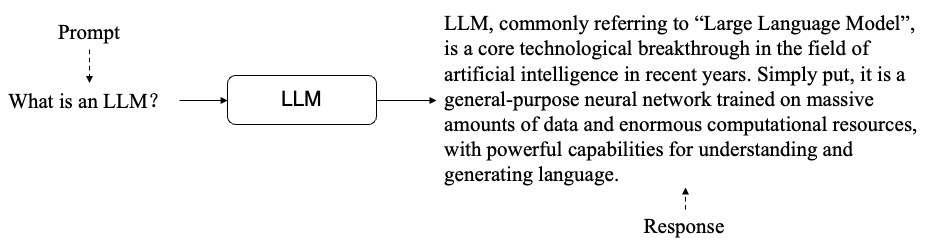
When a user sends an input (also called a "prompt"), the LLM generates tokens one by one using a "predicting the next token" method, eventually forming a complete response. As models have grown more capable, researchers have found that they can follow instructions in the prompt to complete various tasks. In other words, if the prompt tells the model how to use a tool, the model can make tool calls in the specified format:
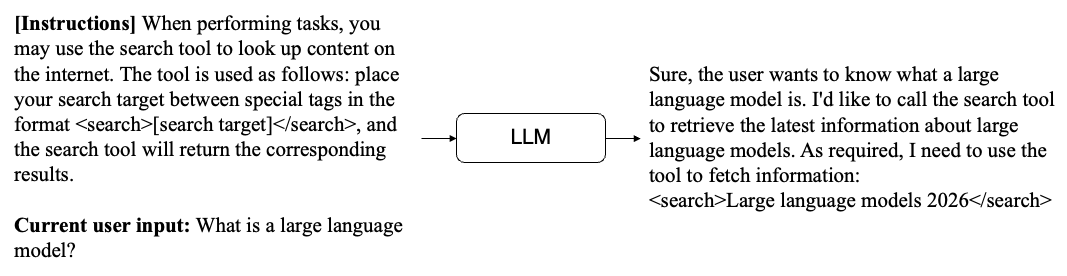
The diagram above shows a simple tool call. The model's response includes a tool request following the format defined in the prompt. When the user side receives this request, it can extract the query "2026 large language models", run a search using the search tool, and get the results. Then, we can combine these results with the previous input and send everything back to the model. The model will then know the result of its tool call and can generate the next response.
Two important points about this process:
- The model cannot remember previous prompts. To make the process appear continuous, every prompt must include all previous content. This is how the model maintains awareness of its earlier actions and results. All of the model's coherent behavior is achieved by continuously appending to the prompt. This is also why many people complain that the lobster consumes a lot of tokens.
- The LLM can only call a tool and wait for the result. The actual execution of the tool has nothing to do with the LLM. If a tool returns an incorrect result or fails, the LLM cannot fix it.
Summary: The action process of an agent is essentially the LLM repeatedly calling tools and receiving results. Once it has gathered enough information, it can give the user a final response. This process follows the classic agent framework called ReAct [3]. All of the LLM's behavior is carried out through tools, and it maintains coherence by appending all interaction records to the prompt.
2. The Birth of OpenClaw
OpenClaw's story is quite remarkable.
Its creator is Peter Steinberger, an independent developer from Austria. With no team and no funding, Steinberger built it from scratch by himself. Most of the source code was even generated by AI. From creating the GitHub repository to the official release, it took him only two to three months. As he said himself: "A year ago, this would have been absolutely impossible. No model could have allowed one person to build something of this scale".
The project's name also went through an interesting journey:
- In November 2025, the project was originally called Clawdbot. Since it was developed using Claude, and "Clawd" happens to be the name of Claude's little mascot (a crab), the name was a play on words, as if turning Clawd into a robot.
- On January 27, 2026, Anthropic noticed that its mascot's name was being used in someone else's project and issued a warning. The project was then renamed to Moltbot ("molting robot"), which is where the "lobster" nickname comes from. The word "molting" also implies that this lobster keeps growing and evolving (and some of OpenClaw's designs do reflect this idea).
- Around the same time, a cryptocurrency called $Clawd suddenly appeared in the United States, claiming to be the official token of OpenClaw. It attracted many unsuspecting people and caused significant financial losses.
- On January 30, 2026, Steinberger quickly renamed the project again to OpenClaw. The name highlights that this is an open source project with no connection to cryptocurrency, while preserving "Claw" as a nod to its origins.
- On February 14, 2026, Steinberger joined OpenAI, and the OpenClaw project was transferred to an open source foundation.
- In March 2026, OpenClaw reached the top of GitHub's all-time star rankings with over 310,000 stars, surpassing React's 13 years of accumulation.
3. OpenClaw's Architecture and How It Works
OpenClaw itself is an agent framework (a piece of software), not a new LLM. It actually works as a layer between the user and the LLM, as shown below:

When the user sends a task, OpenClaw processes and packages the request, sends it to the LLM, gets the result, and returns it to the user. Note that after receiving the user's task, there may be multiple rounds of interaction between OpenClaw and the LLM. For example, if the LLM needs to use a tool, OpenClaw is responsible for packaging the tool's result back into a prompt and sending it to the LLM again. This cycle repeats until the LLM returns a final result, at which point OpenClaw sends the final response to the user. In this setup, OpenClaw does not contain an LLM itself. It is simply a middleware layer between the user and the LLM that delivers an agent experience through its unique design.
Architecture: How OpenClaw Is Designed
OpenClaw's architecture can be simplified as shown below (based on [4]):
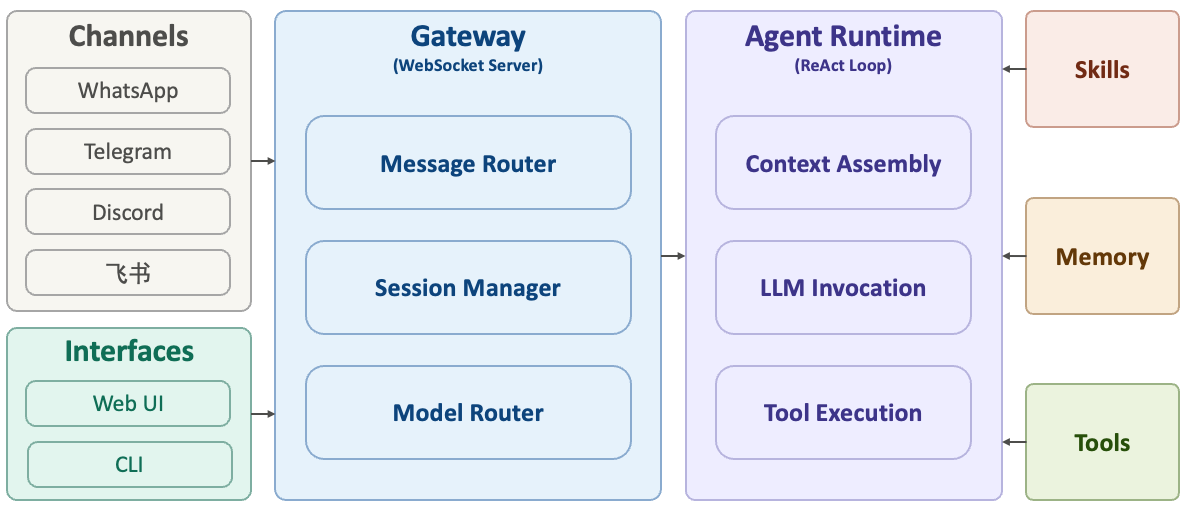
We can divide OpenClaw's structure into three layers (left, center, right):
- Center: Gateway. This is the core of the system, built on a WebSocket Server. All message sources and control platforms must connect through it. Its main responsibilities include message routing (delivering messages to the correct session), session management (maintaining the state of different conversations), model routing (deciding which LLM to call), and access control (checking whether the message source is whitelisted).
- Left: Channels and Control Interfaces. Channel adapters handle messages from different platforms and convert them into a unified format. OpenClaw supports over 30 messaging platforms, including WhatsApp, Telegram, Discord, and Feishu. When a message arrives, the system performs identity verification, message parsing, and format normalization to ensure that all messages flow through the system in a consistent format. The control interfaces allow users to manage the agent through a Web UI, CLI, or macOS app.
- Right: Agent Runtime. This is where OpenClaw actually does the work, based on the ReAct loop described earlier. It handles three main tasks: (1) Context assembly: combining conversation history, the current message, system prompts, skill lists, and memory into a prompt for the model; (2) LLM invocation: having the model read the context, reason, and decide on the next action; (3) Tool execution: carrying out the model's commands (file operations, API calls, shell commands, etc.) and feeding the results back to the model.
- Far right: Skills, Memory, and Tools are modules that the agent interacts with during its operation. Think of them as "plugins" for the system.
System Prompt: The Core of OpenClaw
In the first section, we explained that agents understand how to use tools by reading the prompt. But when we use OpenClaw, we only send a simple message. Where does the LLM get all the tool information? In reality, the LLM receives much more than just the user's input. OpenClaw has designed a very complex system prompt that is appended to the user's message to guide the LLM in completing various tasks.
OpenClaw's prompt design includes the following key parts:
- Identity information: SOUL.md (the "soul"), IDENTITY.md (the lobster's name and other identity details), USER.md (user information), MEMORY.md (memory)
- Tool information: what tools are available and how to use them
- Behavioral guidelines: AGENTS.md (defining how the agent should work)
- Skill information: what skills are available
- Memory information: where to find previous memories
All of these system prompts are appended to every user message, which is why OpenClaw's token consumption is very high. There is a joke on Xiaohongshu (a Chinese social media platform) about someone spending $3 just to have the lobster tell a joke. This happens because OpenClaw may perform many searches, interact with the LLM multiple times, and include large system prompts in each interaction, resulting in extremely high token usage. By rough estimates, when OpenClaw receives a simple message like "Who are you?", it may send over 4,000 tokens of input to the LLM.
From the complexity of the system prompt, we can see two key points:
- The model's behavior is entirely driven by the content in the prompt. No matter how complex the task is, the only way to interact with the LLM is through prompts.
- Such complex prompt design demands a highly capable LLM. This is why some people find the lobster very smart while others find it clumsy: they are likely using different LLMs.
How OpenClaw Operates Your Computer
OpenClaw operates your computer through tool calls, as described earlier. It comes with the following default tools:
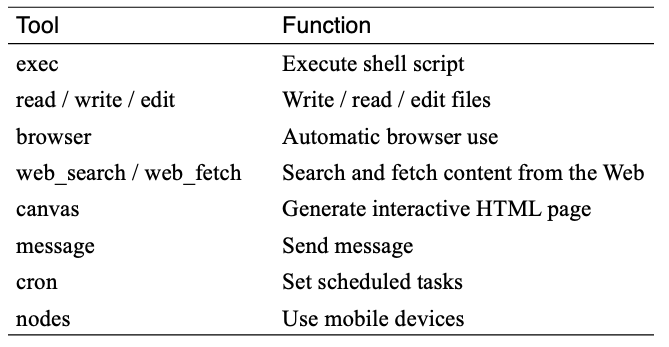
Here is a simple example to illustrate how OpenClaw operates a computer. Suppose the task is: open file A on the desktop, read the questions inside, answer them, and write the answers to file B. After receiving this task, OpenClaw's workflow would look roughly like this:
- The user sends the task. OpenClaw receives it, adds the system prompt (which includes read/write tools), and sends everything to the LLM.
- The LLM reads the tool information and the user's request, then returns a response requesting the "read file" tool: Read(A).
- OpenClaw receives the response, parses the "read file" request, uses the corresponding code to read file A, appends the file's content to all previous messages, and sends everything back to the LLM.
- The LLM receives the input and returns a new response requesting the "write file" tool, with the answer included: Write(answer, B).
- OpenClaw receives the response, parses the "write file" request, uses the corresponding code to write to file B, appends the success result to all previous messages, and sends everything back to the LLM.
- The LLM sees that the file was written successfully and returns "Task complete".
- OpenClaw receives the response, finds no tool call requests, and returns the result directly to the user. The user sees "Task complete".
As you can see, OpenClaw and the LLM interacted multiple times, and the LLM called two different tools to complete this task. In practice, no matter how complex the task is, OpenClaw and the LLM always work through this kind of iterative back-and-forth process.
4. Clever Design Details in OpenClaw
Personalization
OpenClaw's personalization includes several parts. Two of the most important ones are SOUL.md and USER.md.
SOUL.md, as the name suggests, is called the "soul" by its creator. It is simply a Markdown file (think of it as a plain text file). This file describes the lobster's behavioral guidelines, such as staying reliable, being faithful to sources, and respecting the user. The entire content of this file is loaded into the system prompt, meaning the LLM sees the full file every time. This helps maintain consistent behavior.
USER.md contains information about the user, including the user's name, nickname, time zone, and more. Like SOUL.md, it is fully loaded into the system prompt to help the model maintain a consistent understanding of the user.
Skills
The concept of Skills was not invented by OpenClaw. It was originally proposed by Anthropic. Since OpenClaw's developer has long been a Claude user, a similar design was incorporated into OpenClaw.
A Skill can be thought of as a workflow for completing a task. Each Skill contains a Markdown file and related executable scripts. An example is shown below (I could not find the original source; if anyone knows, please let me know so I can add it to the references).
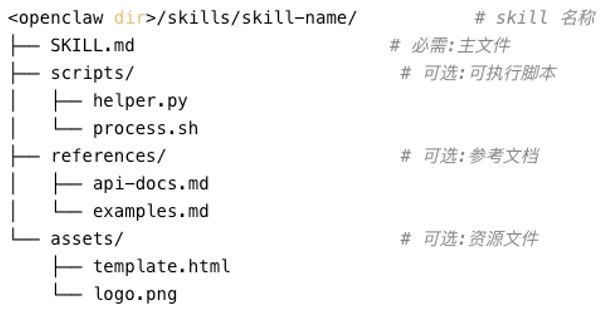
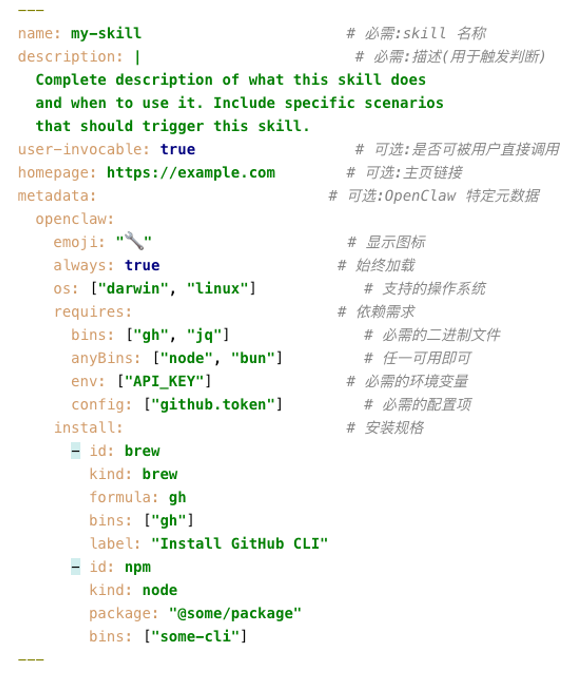
The most important fields in a SKILL.md file are:
- description: What the skill does and when to use it
- requires: What software the skill depends on
- install: How to install the required software if it is missing
Each skill is essentially a packaged workflow. For example, an "image generation" skill might work like this: first, read the user's request; then interpret the request; then call Google Nano Banana to generate the image; and finally return the image to the user. When the LLM reads the skill's content, it can follow these steps to complete the task.
It is important to note that skills are loaded into the model's input as plain text. Whether a skill activates correctly depends on whether the model can accurately understand and follow the instructions in the skill file. If the skill contains incorrect descriptions or malicious content, the model will read that too. This is why skills can pose significant security risks. OpenClaw's skill hub, ClawHub, allows users to share their own skills, but it does not review the content. If a user adds malicious behavior to a skill file, anyone who installs that skill could be harmed.
On the other hand, while a single skill may not contain much text, the number of skills can grow quickly. Loading the full content of all skills into the prompt would be impractical. In practice, OpenClaw's system prompt lists each skill's name, description (trigger conditions), and file path, and tells the LLM to look up the original file if it needs to use a skill.
Memory
As users interact with OpenClaw more and more, loading all previous content into the prompt every time becomes very inefficient. LLMs also have a context window size limit, so increasing the prompt length indefinitely would eventually cause the model to fail. OpenClaw uses two memory mechanisms to compress the user's historical messages and actions:
First, there is long-term memory. This stores key facts, decision history, and tool usage experience. This memory is fully loaded into the prompt and sent to the model.
Second, there is a diary, also called short-term memory. This is recorded on a daily basis, with the filename being the date. It records everything that happened each day. Since this content grows over time, OpenClaw does not load all diary entries. Only the diary from the current day and the previous day is loaded at the start of each session.
OpenClaw also provides two tools: memory_search and memory_get. When the model needs to look up past memories, it can call these tools. Note that unless the user explicitly asks OpenClaw to save something to memory, memory management is an autonomous behavior driven by what the model reads in the prompt.
OpenClaw's memory module is actually quite simple and rough. Its real-world performance is mediocre, and many users have complained about it online. Several open source alternatives are now available that can be integrated into OpenClaw for better memory management.
Heartbeat
The heartbeat is what I consider the most inspired design in OpenClaw. This mechanism automatically sends a message to the LLM at regular intervals (30 minutes by default), asking the model to check HEARTBEAT.md for tasks that need to be completed. For example, if you write "Greet the user" in HEARTBEAT.md, then every 30 minutes, OpenClaw will send this instruction to the model, and the model will generate a response accordingly. This is one of the reasons many people feel that OpenClaw has a "human-like" quality: it sends a request to the LLM every half hour and returns the response to the user, making it feel "alive."
In addition to the heartbeat, OpenClaw also offers a time-related feature called cron (a timer). When the user makes a request that involves a future time (such as "do this later"), OpenClaw uses the timer to set the exact time, and sends a message to the model when that time arrives. This effectively gives the model the ability to "wait". Normally, when we use an LLM, it does not wait. Once it receives a request, it immediately generates a response. It cannot pause between receiving a request and generating a response. For example, if we ask OpenClaw to upload a file to a website and wait for the processing to finish before downloading, the model cannot "wait" between the upload and the download. With the timer, OpenClaw can set a waiting period after the upload is complete, and when the timer expires, it sends a new request to the LLM to complete the download.
5. Security Concerns with OpenClaw
OpenClaw has security issues on multiple levels:
First, since OpenClaw was built by a developer using AI tools, the code contains a number of vulnerabilities. Some security flaws in its early versions have already led to serious incidents. If you have been following OpenClaw's updates recently, you may have noticed that each new version comes with some functional issues. This is because the developer has not always maintained the codebase well during updates.
Second, to make OpenClaw useful and able to complete tasks, users typically grant it elevated permissions. Once these permissions are granted, OpenClaw can control the computer. Since all of OpenClaw's behavior is fundamentally driven by the LLM, the model inevitably makes errors during generation. An AI researcher on Twitter authorized OpenClaw to organize his email. He then discovered that OpenClaw kept deleting his emails. Despite sending multiple messages telling OpenClaw to stop, he could not halt the behavior. In the end, he had to physically unplug the computer to stop it. In the post-incident review, it was found that although the researcher had told OpenClaw before the task to confirm with him before deleting anything, the context had grown too long. The model did not write this requirement to memory, so it gradually forgot the user's initial instruction. This is why many people recommend installing OpenClaw on a brand-new or old computer, rather than on your primary work machine.
Third, OpenClaw has many open designs for flexibility and ease of use. For example, skills can be freely shared by users on ClawHub. But this openness also brings security risks. If malicious behavior is injected into a skill, any user who downloads and loads that skill may trigger dangerous actions by the model.
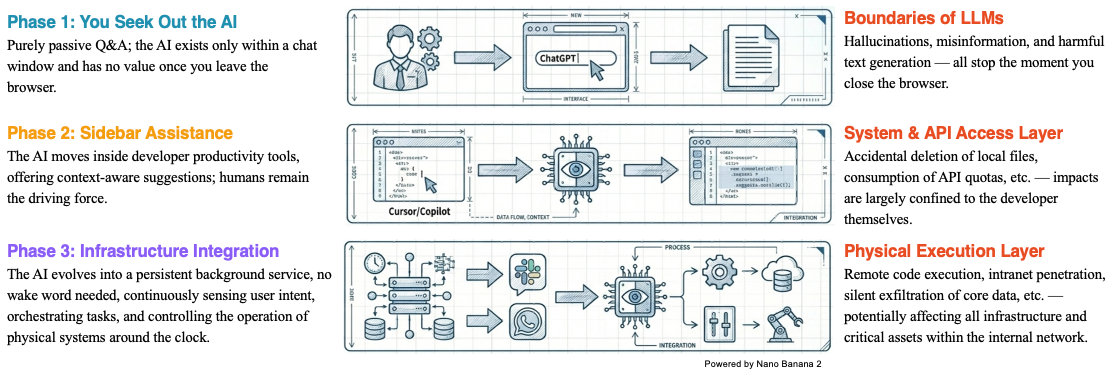
If we look at the overall development of AI, we can see that we are letting AI play an increasingly larger role in our daily work. At first, we only interacted with AI through chat windows. The risk back then was limited to receiving incorrect or hallucinated information, which did not cause any real harm to our files. We could simply close the browser and the risk was gone. But as AI has entered our lives further, we have started letting it manipulate our local files. For example, many AI coding tools today can automatically write code and modify files based on natural language input. If AI's behavior goes out of control during this process, it can cause significant damage to our local files and programs. Going even further with agents like OpenClaw, which can fully operate an entire computer, the potential harm and risk are even greater. Therefore, as we wish for AI to become more powerful, we are also gradually giving up control and must accept the corresponding risks. This is a risk awareness that everyone should develop when using AI tools.
6. Personal Thoughts on OpenClaw
Finally, I would like to share some of my own views on OpenClaw:
Q1: Why is OpenClaw so popular?
A1: I believe the main reason is its unique agent design, which makes us feel as if AI has truly entered our daily lives. Previously, using AI or LLMs meant chatting with them in a window. Now, the AI seems to actually run on our local computer and can complete all kinds of tasks. OpenClaw's unique features, such as the memory system, personalization, and heartbeat mechanism described above, further make it feel as if the lobster has come alive and can evolve on its own. That said, we cannot deny that OpenClaw's explosive popularity has been partly driven by capital. As mentioned earlier, OpenClaw is extremely token-intensive, consuming far more than regular web-based chatting. Major companies have rushed to launch their own versions of the lobster, each connecting to their own LLM. This is fundamentally a competition for users. Whoever captures users now may be able to provide ongoing services in the future.
Q2: Is OpenClaw actually useful?
A2: I believe it is very useful for long-term, repetitive tasks. For example, collecting the latest papers on a specific topic every day, or writing daily reports. But for complex tasks, especially those that require human judgment, a fully autonomous agent like OpenClaw is not suitable. Right now, I think OpenClaw is not yet mature. If you do not have enough time and knowledge to research and customize it, it probably will not be very helpful. Wait a little longer. Companies will continue to improve their products and strengthen their security measures. Starting your agent experience then will not be too late.
Q3: What is the significance of OpenClaw?
A3: I think there are two important points. First, OpenClaw helps popularize the basic concept of agents and builds public awareness of what agents are. I believe agents will eventually become part of daily life, though probably not in their current form. But experiencing this early version is still a valuable experience. Second, OpenClaw helps people develop an awareness of paying for AI services and managing permissions early on. The first thing you do after downloading OpenClaw is enter an API key, and behind every API key is a bill. In the future, using the most advanced AI will inevitably require payment. As for permission awareness, I think the discussion above makes it clear: if an agent has unlimited permissions, we may not be able to control its behavior.
References
[1] https://cloud.google.com/discover/what-are-ai-agents?hl=en
[2] https://lilianweng.github.io/posts/2023-06-23-agent/
[3] ReAct: Synergizing Reasoning and Acting in Language Models, Yao et al., 2022.
[4] https://ppaolo.substack.com/p/openclaw-system-architecture-overview